Text Formatting & Content Writing Tips
Text Formatting
Issues may sometimes arise with text that is being pasted into Cascade from Outlook or Word. To prevent this, we ask that you use the "Paste as text" option when pasting text into Cascade. In order to do this, please follow these steps.
- Open the Word document or email that contains the text that you wish to copy and paste into Cascade.
- Copy the text (Ctrl + C).
- Navigate to the text editor in Cascade (which is visible when editing the page).
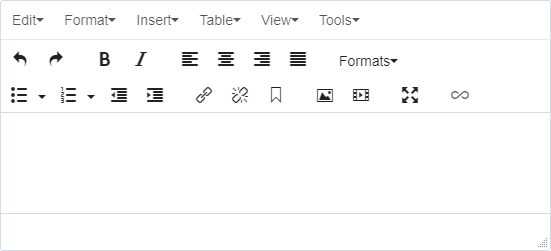
- Select the "Edit" menu and then select "Paste as text".
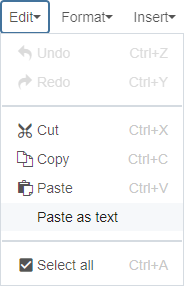
- The "Paste as text" option will now be selected (visible when clicking the "Edit" menu again).

- Paste the text into the text editor in Cascade (Ctrl + V). This will remove all existing formatting but it will also remove any associated issues with the text.
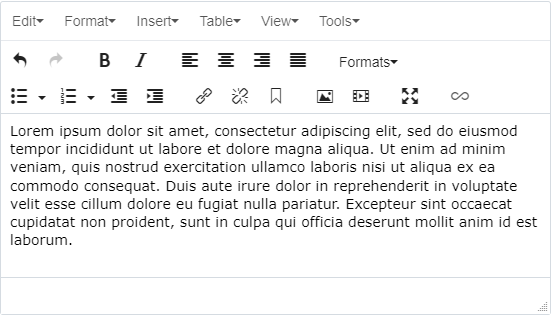
- You will need to reapply any existing formatting options via the editor and you will need to recreate any existing links.
The following formatting options are available to you via the editor to enhance and organize the layout of your pages.
Headings
H2
H3
H4
H5
H6
H1 is reserved for page titles and should not be repeated within the body copy of the page.
Paragraphs
Lorem ipsum dolor sit amet, consectetur adipiscing elit, sed do eiusmod tempor incididunt ut labore et dolore magna aliqua. Ut enim ad minim veniam, quis nostrud exercitation ullamco laboris nisi ut aliquip ex ea commodo consequat. Duis aute irure dolor in reprehenderit in voluptate velit esse cillum dolore eu fugiat nulla pariatur.
Lorem ipsum dolor sit amet, consectetur adipiscing elit, sed do eiusmod tempor incididunt ut labore et dolore magna aliqua. Ut enim ad minim veniam, quis nostrud exercitation ullamco laboris nisi ut aliquip ex ea commodo consequat. Duis aute irure dolor in reprehenderit in voluptate velit esse cillum dolore eu fugiat nulla pariatur.
Lorem ipsum dolor sit amet, consectetur adipiscing elit, sed do eiusmod tempor incididunt ut labore et dolore magna aliqua. Ut enim ad minim veniam, quis nostrud exercitation ullamco laboris nisi ut aliquip ex ea commodo consequat. Duis aute irure dolor in reprehenderit in voluptate velit esse cillum dolore eu fugiat nulla pariatur.
Styling
Bold
Italics
Underlining should not be used as underlined text is reserved for hyperlinks.
Lists
Unordered Lists
- Line 1
- Line 2
- Line 3
Ordered Lists
- Line 1
- Line 2
- Line 3
Content Writing Tips
- Keep content brief.
- Use short sentences. Focus on one idea per sentence.
- Write short paragraphs. One to two sentences per paragraph.
- Avoid lengthy introductions or conclusions.
- When appropriate, use lists or visuals instead of long blocks of text.
- Prioritize readability.
- Users view content on desktops, tablets and mobile devices.
- Write for quick scanning and easy comprehension.
- Responsive design adapts layouts for different screens, so concise writing improves usability.
- Structure content for online audiences.
- Use bullet points and numbered lists when possible.
- Limit lists to about 7 items (10 maximum).
- Place the most important information first.
- Present information clearly and concisely.
- Avoid unnecessary adjectives, adverbs and complex sentences.
- Use active voice.
- Write in a conversational tone when appropriate.
- Use present or future tense whenever possible.
- Organize details in short sections and logical order.
- Avoid repeating information for emphasis.
- Avoid semicolons and excessive punctuation.
- Limit sentences to one comma when possible (except in lists).
- Write with search engine optimization (SEO) in mind.
- Identify key phrases and keywords relevant to the topic.
- Use keywords naturally in page titles, headings, labels and introductory text.
- Avoid keyword overuse, which can negatively affect search rankings.